
Canonical URLs: The Hidden SEO Problem Costing Your Business Rankings
Your website might be fighting against itself in Google’s search results—and you wouldn’t even know it. This silent SEO killer is called a canonical URL issue, and it’s more common than you think.
Imagine spending months creating brilliant content, optimising your website, and building backlinks—only to discover that Google is confused about which version of your pages to show in search results. That’s exactly what happens when canonical URL problems go unnoticed.
For small businesses especially, this isn’t just a technical nuisance. It’s lost revenue, wasted marketing budget, and missed opportunities to outrank your competitors.
What Exactly Are Canonical URLs?
Let’s cut through the technical jargon. A canonical URL is the “official” or “preferred” version of a web page that you want search engines to index and show in results.
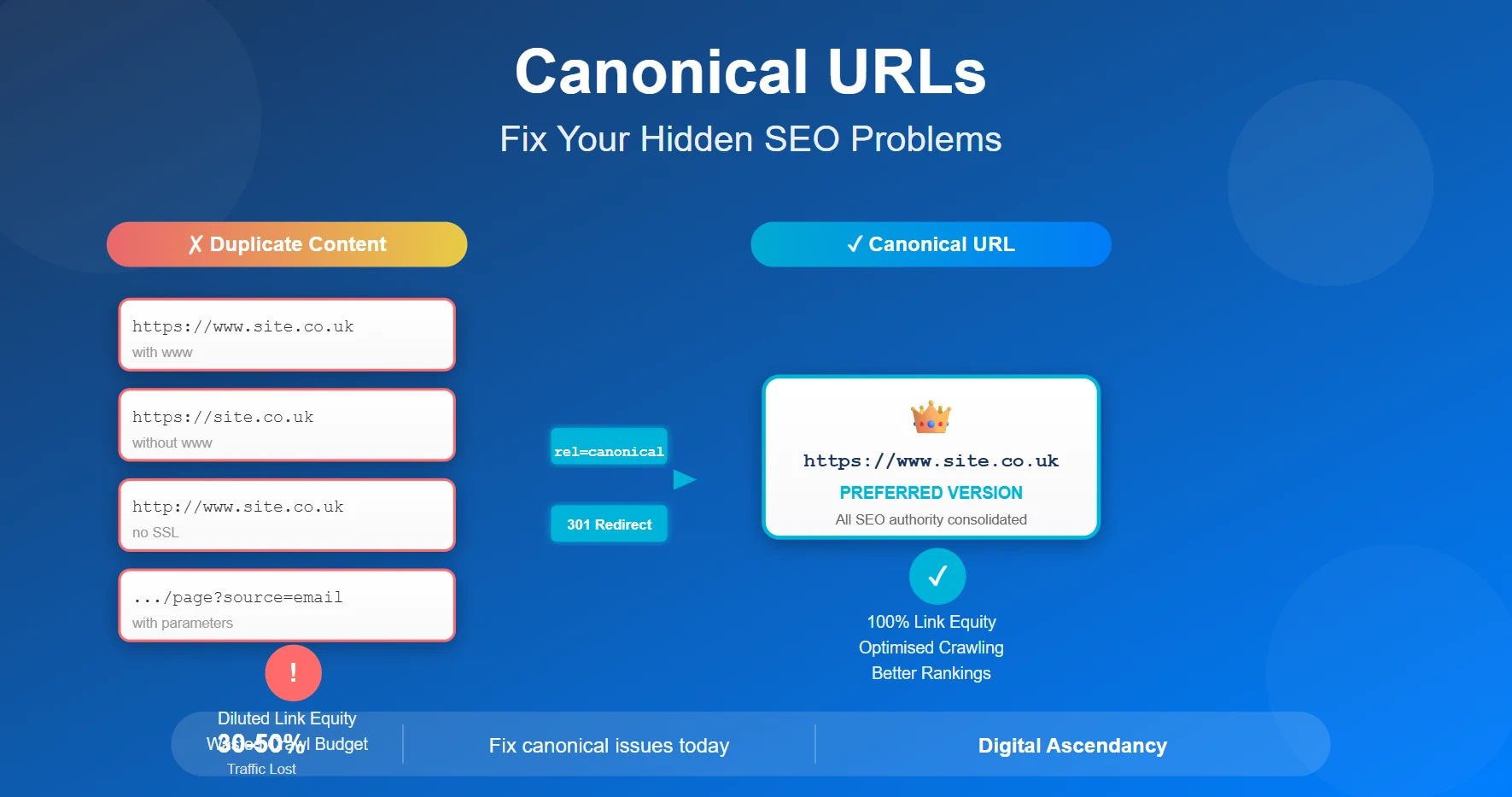
Here’s the problem: your website might be accessible through multiple URLs that display the exact same content:
https://www.yoursite.co.uk/serviceshttps://yoursite.co.uk/services(without www)http://www.yoursite.co.uk/services(without SSL)https://www.yoursite.co.uk/services/(with trailing slash)https://www.yoursite.co.uk/services?source=email(with parameters)
To you, these all look the same. But to Google, they’re five different pages with duplicate content. And that’s where your SEO problems begin.
The Real Cost of Canonical Issues
A small business with canonical problems typically loses 30-50% of their potential organic traffic. For a business that could be getting 500 monthly visitors, that’s 150-250 potential customers simply vanishing into the ether.
Why Canonical URL Problems Destroy Your SEO
1. Diluted Link Equity (PageRank)
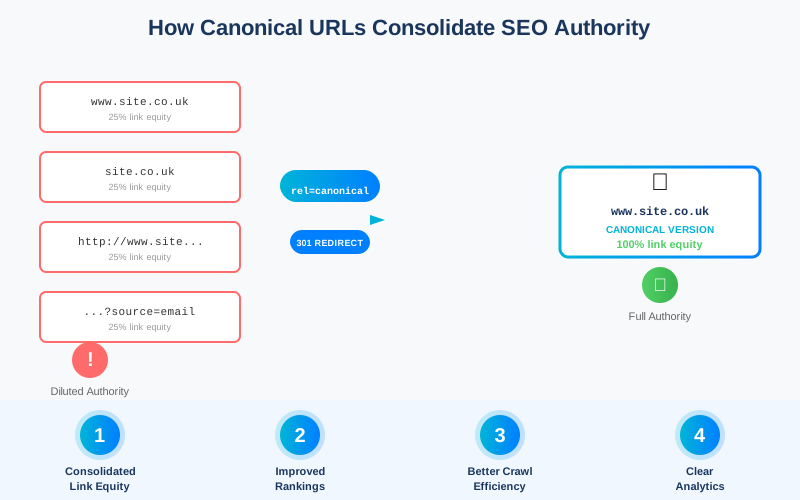
When other websites link to your content, some might link to www.yoursite.co.uk whilst others link to yoursite.co.uk. Google treats these as separate pages, so your hard-earned backlinks get split across multiple URLs instead of strengthening one authoritative page.
Real-World Example: A solicitor’s firm had 100 backlinks, but they were split between four URL variations. Instead of having 100 links pointing to one authoritative page, they had 25-30 links each pointing to four “separate” pages. Their competitor with just 60 backlinks to a single canonical URL was outranking them.
2. Wasted Crawl Budget
Google allocates a limited “crawl budget” to your website—the number of pages it will crawl during each visit. When you have multiple versions of the same page, Google wastes time crawling duplicates instead of discovering your important new content.
For small business websites with 50-200 pages, this might mean Google takes weeks longer to index your latest blog posts or service pages.
3. Duplicate Content Confusion
Google’s algorithm tries to show users the most relevant, unique content. When it encounters multiple URLs with identical content, it must choose which one to rank. Often, it chooses the “wrong” version—perhaps the one without your latest updates, or without proper tracking parameters.
Common Symptoms of Canonical Problems:
- Pages not appearing in Google Search Console
- Rankings fluctuating dramatically week-to-week
- Same content ranking for different URLs on different days
- Lower-than-expected organic traffic despite good content
- Google indexing the “wrong” version of your pages
4. Analytics Reporting Nightmare
When traffic is split across multiple URL versions, your Google Analytics reports become fragmented. You can’t accurately measure which pages perform best, making data-driven decisions nearly impossible.
How to Check If Your Site Has Canonical Issues
Quick Diagnostic Tests
Test 1: The URL Variation Check
Open your website using these four variations and see if they all load:
- http://www.yoursite.co.uk
- https://www.yoursite.co.uk
- http://yoursite.co.uk
- https://yoursite.co.uk
If more than one version loads, you have a problem.
Test 2: Google Search Console Check
- Log into Google Search Console
- Go to “Coverage” or “Pages” report
- Look for “Duplicate without user-selected canonical” warnings
- Check the “Excluded” section for canonical-related issues
Test 3: Site Search Test
In Google, type: site:yoursite.co.uk
Look through the first 20-30 results. Are you seeing multiple versions of the same page? That’s a red flag.
Pro Tip: Use the “View Page Source” option in your browser and search for “rel=canonical”. If this tag is missing or points to the wrong URL, you’ve found your problem.
How to Fix Canonical URL Issues: Step-by-Step Solutions
Solution 1: Implement Proper 301 Redirects
Choose your preferred URL structure (we recommend https://www) and redirect all other versions to it.
For WordPress users:
- Go to Settings → General
- Ensure both “WordPress Address (URL)” and “Site Address (URL)” use the same format (both with or without www, both with https://)
- Install a plugin like “Really Simple SSL” to enforce HTTPS
- Use “Redirection” plugin to set up any remaining 301 redirects
For technical users (via .htaccess):
# Redirect to https://www version
RewriteEngine On
RewriteCond %{HTTPS} off [OR]
RewriteCond %{HTTP_HOST} !^www\. [NC]
RewriteCond %{HTTP_HOST} ^(?:www\.)?(.+)$ [NC]
RewriteRule ^ https://www.%1%{REQUEST_URI} [L,NE,R=301]
Solution 2: Add Canonical Tags to Every Page
The canonical tag tells search engines which URL is the “master” version. It should be present in the <head> section of every page.
For WordPress
Install Yoast SEO or Rank Math—both automatically add proper canonical tags to your pages.
For manual implementation
<link rel="canonical" href="https://www.yoursite.co.uk/your-page/" />Critical Warning: Never point the canonical tag to a different page with different content. The canonical URL should point to itself (or the preferred version of the exact same content). Misusing canonical tags can de-index your pages entirely.
Solution 3: Fix URL Parameters and Trailing Slashes
Decide on a consistent approach:
- Trailing slashes: Choose either
/services/or/servicesand stick with it - URL parameters: Use canonical tags to tell Google which parameters to ignore (like tracking codes)
- Lowercase everything: Configure your server to redirect uppercase URLs to lowercase versions
Solution 4: Update Your XML Sitemap
Your XML sitemap should only include the canonical version of each page. Remove any duplicate URLs.
Steps:
- If using Yoast SEO: Go to SEO → General → Features, ensure XML sitemaps are enabled
- Review your sitemap at
yoursite.co.uk/sitemap.xml - Verify each URL uses your preferred format
- Submit the updated sitemap to Google Search Console
Solution 5: Configure Google Search Console Properly
Add your preferred URL version to Google Search Console and verify it. If you have multiple properties (www and non-www), set the preferred domain in the settings.
Special Cases: When Canonical Tags Are Essential
E-commerce Sites with Product Variations
If you sell products with colour or size variations accessible via different URLs, use canonical tags to point all variations to the main product page.
Example:
/product/t-shirt?colour=red→/product/t-shirt?colour=blue→/product/t-shirt?colour=green→- All point to:
/product/t-shirt
Syndicated or Republished Content
If you publish your content on multiple platforms (like Medium, LinkedIn, or partner sites), add a canonical tag pointing back to the original URL on your website. This ensures Google credits you as the original source.
Paginated Content
For blog archives or product listings split across multiple pages, each page should have a self-referencing canonical tag (page 2 points to page 2, not to page 1).
Measuring Success ==> What to Expect After Fixing Canonical Issues
After implementing proper canonical URL fixes, you should see:
Week 1-2
Google Search Console errors decrease. Duplicate content warnings start disappearing.
Week 3-4
Rankings stabilise. The correct URL versions start appearing in search results consistently.
Week 6-8
Organic traffic increases by 20-40% as link equity consolidates and Google re-evaluates your pages.
Week 8-12
Full benefits realised. Rankings improve, crawl budget optimisation leads to faster indexing of new content.
Monitor These Metrics
- Google Search Console: “Coverage” and “Duplicate content” errors should trend downwards
- Organic Traffic: Expect a 25-50% increase within 2-3 months
- Rankings: Target keywords should stabilise and improve
- Index Status: Verify the correct URLs are indexed in Google
- Click-Through Rate: Should improve as the right pages appear in search results
Common Mistakes to Avoid
Don’t Do These:
- ❌ Canonical tag pointing to a 404 page
- ❌ Canonical chains (page A → page B → page C)
- ❌ Different canonical tags on mobile vs desktop versions
- ❌ Canonical tags pointing to redirect URLs
- ❌ Using both noindex and canonical on the same page
- ❌ Forgetting to update canonical tags after site migrations
Your Canonical URL Checklist
Use this checklist to ensure your canonical URL implementation is rock-solid:
Pre-Implementation Checklist
- ☐ Audit all URL variations using site: search
- ☐ Check Google Search Console for duplicate content warnings
- ☐ Document which URL format you’ll use as canonical
- ☐ Review existing canonical tags (if any)
- ☐ Back up your website before making changes
Implementation Checklist
- ☐ Set up 301 redirects for all non-canonical URL versions
- ☐ Add canonical tags to every page
- ☐ Update XML sitemap with canonical URLs only
- ☐ Configure preferred domain in Google Search Console
- ☐ Test all URL variations to ensure proper redirects
- ☐ Verify canonical tags in page source
Post-Implementation Checklist
- ☐ Request re-indexing in Google Search Console
- ☐ Monitor Search Console for new errors
- ☐ Track rankings weekly for the first month
- ☐ Verify Analytics tracking is working correctly
- ☐ Check site: search results after 2 weeks
The Bottom Line
Canonical URL issues are one of the most common—and most damaging—SEO problems affecting small business websites. The good news? They’re also one of the easiest to fix once you know what you’re doing.
By implementing proper canonical URLs, you’re not just fixing a technical problem. You’re consolidating your SEO authority, making better use of your crawl budget, and ensuring Google shows your best pages to potential customers.
Is Your Website Struggling with Canonical Issues?
Don’t let technical SEO problems hold your business back. At Digital Ascendancy, we specialise in identifying and fixing canonical URL issues, duplicate content problems, and other SEO challenges that affect small businesses.
Our comprehensive SEO audits uncover hidden problems costing you rankings—and we provide clear, actionable solutions.
Want more practical SEO tips delivered straight to your inbox? Subscribe to our newsletter for weekly insights on improving your site’s performance, rankings, and conversions—no jargon, just actionable advice for small business owners.