
Last month we covered the difference between an AI chatbot and an AI agent, and how tools like ChatGPT, Claude and Gemini have quietly added “agent mode” for multi-step tasks. If you haven’t read it yet, it’s worth five minutes: AI Chatbots vs AI Agents: What’s the Difference?
That post ended with some sensible ground rules: start small, review everything, limit access, stay the final check. Good advice, and it holds. But it leaves an obvious question unanswered. What happens once the task stops being small?
This is where a lot of small business owners get stuck. You’ve had a go with agent mode in ChatGPT or Gemini, it worked well enough on a one-off research task, and now you’re wondering whether the same approach can carry your actual, repeating admin: booking enquiries, onboarding new customers, chasing invoices. Here’s the honest answer.
Where Agent Mode Does Fine, As Is
Nothing wrong with reaching for ChatGPT or Gemini’s agent mode for the tasks it’s actually built for:
- A one-off research job, like comparing three suppliers across their websites
- Drafting a first pass at something you’ll heavily edit yourself
- A task that’s low-stakes if the first attempt isn’t quite right
- Anything you’re happy to sit and supervise from start to finish
For these, you don’t need to build anything. Open the tool, set the goal, review the output. Job done.
Where It Starts to Break Down
The trouble starts when you try to turn a one-off agent-mode session into a repeating part of how you run your business. Four things tend to go wrong.
1. It forgets your process every time. Agent mode in a general-purpose chat tool doesn’t remember that your business always books a 15-minute call, always sends the same welcome sequence, or always flags a refund over £50 for you to check first. You’re re-explaining the rules every session, which defeats the point of automating anything.
2. It isn’t actually wired into your systems. A general agent can browse and fill in forms, but it doesn’t have a standing connection to your CRM, your calendar, or your payment tool. Anything genuinely useful, like logging a booking straight into HubSpot or triggering a Stripe-based onboarding sequence, needs a proper integration behind it, not a browser tab clicking through your dashboard.
3. Access risk widens every time you connect something new. Our last post flagged this directly: treat a new agent connection like a new hire you’re still training, and only grant what the task needs. That’s easy advice to follow for a single research task. It gets harder to manage once you’re connecting a general-purpose agent to your inbox, calendar and payment details all at once, with no scoped boundary on what it’s allowed to touch.
4. There’s no consistent checkpoint on the risky bit. You can tell agent mode to “check with you before sending anything,” and most of the time it will. But there’s no built-in, tested guarantee that it always pauses on the one action that actually matters, like issuing a refund or sending an invoice. For a single supplier comparison, that’s a minor gap. For something running every week without you watching, it isn’t.
What Changes With a Custom-Built Agent
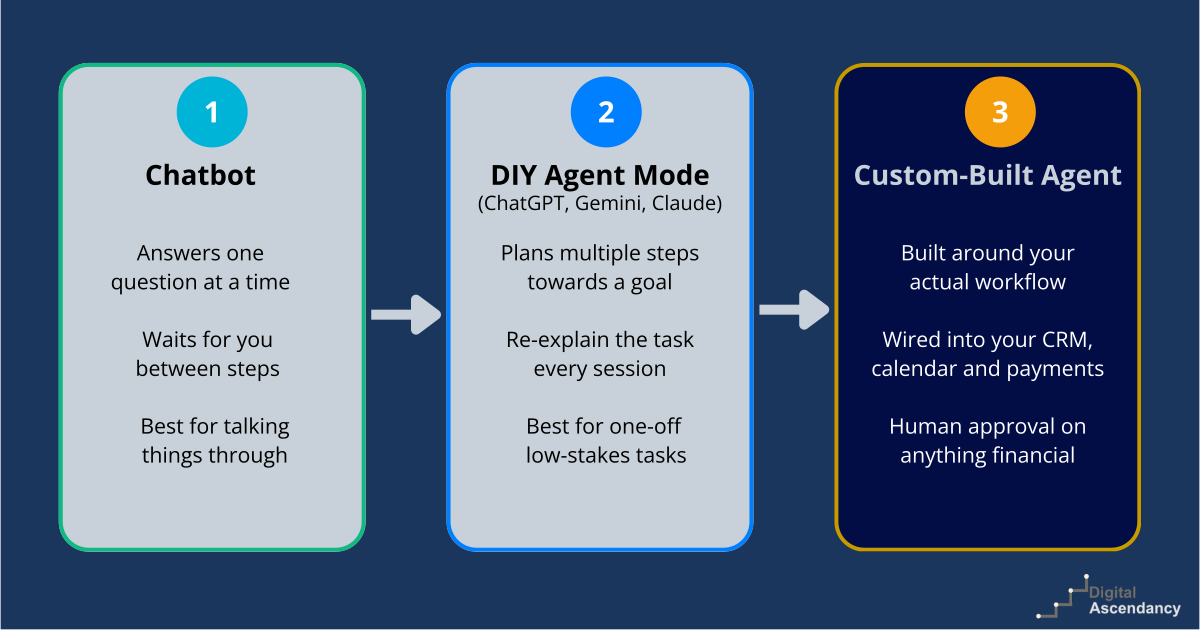
This is the actual difference, and it’s less about the AI model underneath (often much the same technology) and more about what’s built around it.
| DIY Agent Mode | Custom-Built Business Agent |
| Re-explain the task each session | Built once around your actual workflow |
| Browses and fills in forms manually | Connects directly to your CRM, calendar and payment tools |
| Access widens with every new connection you add yourself | Scoped to one defined task, agreed upfront |
| Checkpoint depends on remembering to ask for one | Human-approval step built in on anything financial or irreversible |
| Untested on your specific edge cases | Run against real scenarios before it ever touches a live customer |
Put simply: agent mode is you driving a general-purpose tool through a task, one session at a time. A custom-built agent is a defined piece of your business running in the background, on your rules, every time.
Three Places This Usually Pays for Itself First
You don’t need to automate everything at once. Most businesses start with one of these:
Lead qualification and booking. Qualifies an enquiry, checks your calendar, books the meeting, logs it in your CRM. The natural next step if you already capture enquiries through a chatbot or contact form.
Customer onboarding. Handles what happens the moment someone signs up or pays: welcome sequence, account or course access, a nudge if they go quiet. A good fit for course providers, coaches and subscription businesses.
Internal admin. The recurring task that eats an hour of your week without fail, like inbox triage, invoice chasing, or pulling together a weekly performance summary from your own systems.
A Quick Way to Check Which You Need
Ask yourself two questions. First: is this a one-off, or does it happen every week? If it’s one-off, agent mode in whatever tool you already use is genuinely fine. Second: does it touch money, a customer-facing message, or a system you’d rather not connect an unscoped tool to? If yes, that’s exactly the situation a human-approval checkpoint and a properly scoped build are for.
Worth remembering: the two aren’t rivals here either, same as chatbots and agents weren’t. Keep using agent mode for the odd research task or first-draft comparison. Reach for a custom-built agent for the task that repeats every week and actually needs to be trusted to run on its own.
The Bottom Line
General-purpose agent mode is a genuinely useful tool for one-off, low-stakes tasks, and there’s no need to build anything for those. But a repeating piece of business admin, especially one that touches money, customers or a system you rely on, needs more than a browser tab clicking through your dashboard. It needs something built around your actual process, connected to your actual tools, tested before it goes near a live customer, with a human checkpoint on anything you can’t easily undo.
That’s the gap our AI Agent Development service is built to fill, starting from a single workflow at £495, with human oversight included from day one.
Not sure whether your business needs one yet? Book a free scoping call and we’ll tell you honestly, including if the answer is not yet.